I’ve invited my dear friend Noah to blog here while he’s traveling the world. I’ve equipped him with one of my old laptops and will drive him to the train station on Thursday. He’s going to have a lot of the fun that I wish I was having. But at least I can live vicariously through him.
Blog
-
MySQL Meet-up 20141208
I had an enjoyable time last night at Twitter with local MySQL DBAs and developers. We had an attendee who has no experience with SQL or programming at all. She is interested in organizing her collection of recipes and had heard a rumor that MySQL was a good tool to use for this task. She indicated that her desktop runs Windows 7. I think I’m going to encourage her to turn her concept in to a community project, as she is not the first person I’ve met who wants to organize recipes!
We were hosted by Rob at Twitter, who used to work with Lisa back before she retired. He’s a member of the site reliability team and keeps the fail whale from rearing its blubbery head.
Pizza was provided by my dear friend and long-time open source buddy Gerry Narvaja with the assistance of the folks in the kitchen at Zeek’s.
We discussed new techniques in the areas of load balancing and high availability. Five nines is no longer the thing that people talk about, instead it’s six nines. It’s a brave new world out there!
I was not the only person who was excited about one of the latest features in MariaDB / MySQL to come out of HP, the high resolution time data types.
One of the attendees is an old hand at COBOL and was asking if anyone knows where one can get a COBOL runtime environment. I’ve never thought about that before… Let me ask the googs… Looks like there’s an active project called GNU COBOL which is officially part of the GNU project:
- Release(Sun 19 Jan 2014 09:46:17 AM UTC)
- Project Page
- Documentation
-
Orcas.IO
I registered a domain that I’ll use for Orcas-local projects such as the Orcas Internet Exchange and various things like that.
Pretty fancy, huh?
-
Happy Birthday to Collier Technologies LLC!
Five years ago today, Hannah and I completed all of the forms necessary to stand up our LLC. Okay, alright. Our registered agent actually did all of the hard work. Thanks and happy birthday to you too, Molly!
-
Long Term Stable – 2014.04 @ 20141204T080801
It’s been one of those nights:
cjac@ubuntu0:/data/apps/prod$ sudo apt-get upgrade
Reading package lists... Done
Building dependency tree
Reading state information... Done
Calculating upgrade... Done
0 upgraded, 0 newly installed, 0 to remove and 0 not upgraded.
cjac@ubuntu0:/data/apps/prod$ sudo apt-get dist-upgrade
Reading package lists... Done
Building dependency tree
Reading state information... Done
Calculating upgrade... Done
0 upgraded, 0 newly installed, 0 to remove and 0 not upgraded.
All quiet on the Western Front, it seems.
-
Hello World
It was a good summer. I took some time off work and spent a lot of time at the lake with the girls. Scarlet swam out to the buoy with me at least once.
I am working on improving the network service out here on Orcas and think we may be able to secure a /20 of public v4 space as well as increase the throughput of the pipe. We should know more in the next month or so.
-
multipath over disparate media
default route is now over a set of 3 ipsec tunnels with the voice server at the SIX. Let’s see if this proliant can reliably transport 12Mbit of crypto traffic…

-
Repeater frequencies
Looks like I’ll be testing the 440.775 and 445.775 frequencies.
Nothing in the global frequency database:
http://qrg.globaltuners.com/?q=440.775

-
Juniper Olive VM XML
For use with
http://web.dit.upm.es/vnxwiki/index.php/Vnx-rootfsolive
and
http://blog.gns3.net/2009/10/olive-juniper/2/
$ cd /var/lib/libvirt/images
$ sudo qemu-img create -f qcow2 vnx_rootfs_olive.qcow2 7G
$ sudo wget ftp://ftp-archive.freebsd.org/pub/FreeBSD-Archive/old-releases/i386/ISO-IMAGES/4.11/4.11-RELEASE-i386-miniinst.iso
$ sudo brctl addbr testnet
$ sudo ip addr add 172.18.36.2/24 dev testnet
$ sudo ip link set up dev testnet
$ wget -O /tmp/olive.xml https://wp.colliertech.org/cj/wp-content/uploads/2014/05/olive.xml
$ sudo virsh define /tmp/olive.xml
$ sudo virsh start olive
/tmp/olive.xml follows:
<domain type='kvm'> <name>olive</name> <memory unit='KiB'>1048576</memory> <currentMemory unit='KiB'>1048576</currentMemory> <vcpu placement='static'>2</vcpu> <os> <type arch='x86_64' machine='pc-1.1'>hvm</type> <boot dev='cdrom'/> </os> <features> <acpi/> <apic/> <pae/> </features> <clock offset='utc'/> <on_poweroff>destroy</on_poweroff> <on_reboot>restart</on_reboot> <on_crash>restart</on_crash> <devices> <emulator>/usr/bin/kvm</emulator> <disk type='file' device='disk'> <driver name='qemu' type='qcow2'/> <source file='/var/lib/libvirt/images/vnx_rootfs_olive.qcow2'/> <target dev='hda' bus='ide'/> <address type='drive' controller='0' bus='0' target='0' unit='0'/> </disk> <disk type='file' device='cdrom'> <driver name='qemu' type='raw'/> <source file='/var/lib/libvirt/images/4.11-RELEASE-i386-miniinst.iso'/> <target dev='hdc' bus='ide'/> <readonly/> <address type='drive' controller='0' bus='1' target='0' unit='0'/> </disk> <controller type='usb' index='0'> <address type='pci' domain='0x0000' bus='0x00' slot='0x01' function='0x2'/> </controller> <controller type='ide' index='0'> <address type='pci' domain='0x0000' bus='0x00' slot='0x01' function='0x1'/> </controller> <controller type='sata' index='0'> <address type='pci' domain='0x0000' bus='0x00' slot='0x03' function='0x0'/> </controller> <interface type='bridge'> <mac address='52:54:00:4d:b2:c8'/> <source bridge='testnet'/> <model type='e1000'/> <address type='pci' domain='0x0000' bus='0x00' slot='0x06' function='0x0'/> </interface> <serial type='pty'> <target port='0'/> </serial> <console type='pty'> <target type='serial' port='0'/> </console> <input type='mouse' bus='ps2'/> <graphics type='vnc' port='-1' autoport='yes'/> <video> <model type='cirrus' vram='9216' heads='1'/> <address type='pci' domain='0x0000' bus='0x00' slot='0x02' function='0x0'/> </video> <memballoon model='virtio'> <address type='pci' domain='0x0000' bus='0x00' slot='0x05' function='0x0'/> </memballoon> </devices> </domain> -
Configuring voice service on a Cisco 2801 Integrated Services Router via Asterisk
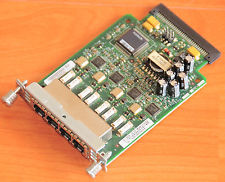
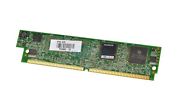
So I’ve configured voice service a number of times, but never using Cisco equipment. There’s a business starting up here on Orcas Island and they need a number of lines voice and fax service. I had a spare 2801 router laying around and heard that it’s possible to provision voice service using these machines. So I looked on eBay for a module that will provide more than two FXS ports and decided on the VIC-4FXS. When it was delivered, I installed it and booted the router. It told me that it needed a PVDM DSP Module, so I got one of those as well. It has arrived. I have installed it. Now when I boot the router, I don’t get a warning or an error.
configure the router to send outbound calls to the SIP server
configure the router to send inbound calls to FXS ports 2,3,4 in round robin
trunk group FXSlines
!
voice-port 0/2/1
 trunk-group FXSlines
!
voice-port 0/2/2
 trunk-group FXSlines
!
voice-port 0/2/3
 trunk-group FXSlines
configure the router to send inbound calls to the correct ports on the VIC-4FXS
dial-peer voice 1 pots
 preference 7
 destination-pattern 3602987792
 translate-outgoing called 10
 port 0/2/0
 forward-digits all
!
dial-peer voice 2 pots
 preference 2
 destination-pattern 3602987793
 translate-outgoing called 10
 port 0/2/1
 forward-digits all
!
dial-peer voice 3 pots
 preference 3
 destination-pattern 3602987794
 translate-outgoing called 10
 port 0/2/2
 forward-digits all
!
dial-peer voice 4 pots
 preference 4
 destination-pattern 3602987795
 translate-outgoing called 10
 port 0/2/3
 forward-digits all
configure the router to accept inbound calls from the asterisk call server
voice service voip
 allow-connections sip to sip
 no supplementary-service sip moved-temporarily
 no supplementary-service sip refer
 fax protocol t38 ls-redundancy 0 hs-redundancy 0 fallback cisco
 sip
  registrar server expires max 3600 min 3600
  localhost dns:8.8.8.8
configure the asterisk call server to send inbound calls to the router
On asterisk call server, edit sip.conf to register with SIP server on cisco router at 172.16.78.209:
[fhvoice]
type=peer
insecure=port,invite
context=fhvoice
disallow=all
allow=ulaw
language=en
canreinvite=no
host=172.16.78.209
qualify=20000
dtmfmode=rfc2833
On asterisk call server, edit extensions.conf and add extensions to the incoming context:
exten => 3602987792,1,Dial(SIP/fhvoice/${EXTEN},30)
   same => n,Hangup()

exten => 3602987793,1,Dial(SIP/fhvoice/${EXTEN},30)
   same => n,Hangup()

exten => 3602987794,1,Dial(SIP/fhvoice/${EXTEN},30)
   same => n,Hangup()

exten => 3602987795,1,Dial(SIP/fhvoice/${EXTEN},30)
   same => n,Hangup()
configure the asterisk call server to accept outbound calls from the router