Category: debian

  • LLC-Technologies-Collier/Demo-SCCC-Byte-AngularJS

    Hello dear readers and attendees,

    This is the post that I will be/ will have been referencing during my presentation to the Seattle Central Community College’s Byte club on Thursday, December 10th at 1500-1630.

    I will begin with a bit of an autobio and find out what kind of students we have in attendance. Please feel free to comment if you’d like to keep in touch before or after the presentation. I will discuss some of the bits and pieces of some industry standard platforms which I’ve developed, deployed, maintained, managed, co-operated, administered and replaced. We can discuss some of the patterns that work well in the industry, and some that are a bit harder to tame.

    Once we have touched most of the areas of specialization represented at the meeting, I will dive in to an AngularJS demo I am developing in github here:

    https://github.com/LLC-Technologies-Collier/Demo-SCCC-Byte-AngularJS/tree/master

    To follow along with the presentation, please run these commands or something similar. My development environment is Debian stable. So yes, this means that we’re not doing a demo of the state of the art. But it also means that the infrastructure has been exercised under load and in production.

    Install Debian package dependencies

    First, install the debian packages of nodejs and npm, the node package manager:

    cjac@debian0:~$ sudo apt-get install nodejs nodejs-dev nodejs-legacy npm
    

    Check out the git repository

    After this, check out the repository from github and create a branch for your work:

    cjac@debian0:~$ mkdir -p /usr/src/git/github/LLC-Technologies-Collier
    cjac@debian0:~$ cd /usr/src/git/github/LLC-Technologies-Collier
    cjac@debian0:/usr/src/git/github/LLC-Technologies-Collier$ git clone git@github.com:LLC-Technologies-Collier/Demo-SCCC-Byte-AngularJS.git
    ...
    cjac@debian0:/usr/src/git/github/LLC-Technologies-Collier$ cd Demo-SCCC-Byte-AngularJS
    cjac@debian0:.../Demo-SCCC-Byte-AngularJS$ git checkout -b $USER
    

    Upgrade to latest npm, install deps

    Once we have the git repository checked out, we’ll grab the latest version of npm and the rest of the node modules

    cjac@debian0:.../Demo-SCCC-Byte-AngularJS$ export PATH="$PWD/node_modules/.bin:$PATH"
    cjac@debian0:.../Demo-SCCC-Byte-AngularJS$ npm install --save-exact npm@"2.1.0"
    cjac@debian0:.../Demo-SCCC-Byte-AngularJS$ npm install --save-exact `cat pkgackage-list.txt`
    

    This post and the associated git repository will be updated between now and the presentation on Thursday. Please chime in and feel free to get involved!

    C.J.
  • Regarding fdupes

    Dear readers,

    There is a very useful tool for finding and merging shared permanent storage, and its name is fdupes. There was a terrible occurrence in the software after version 1.51, however. They removed the -L argument because too many people were complaining about lost data. It sounds like user error to me, and so I continue to use this one. I have to build from source, since the newer versions do not have the -L option.

    https://github.com/tobiasschulz/fdupes

    And so there you are. I recommend using it, even though this most useful feature has been deprecated and removed from the software. Perhaps there should be a fdupes-danger package in Debian?

  • Some statistics from the router at the cabin

    sip0 is a GRE tunnel between the router and the colo box in Seattle, the payload of which is encapsulated as ipsec traffic before being transmitted over the Ubiquity equipment to the switch that the CenturyLink DSL modem attaches to. I don’t get centurylink easter eggs in my search results when I use this interface.

    eth9 is the local gigabit transceiver. Attached directly to a SIP phone which bridges to a gigabit switch, on which the Ubiquity equipment participates.

    lo is the local loopback interface, of course. Good old 127/8

    usb1 is the 100Mbit USB NIC to which the WRT54G with ssid ‘colliertech.org’ is attached. The vast majority of the traffic originates on this interface.

    cjac@wanjet1:~$ uptime
     09:11:18 up 32 days, 18:33,  6 users,  load average: 0.00, 0.01, 0.05
    cjac@wanjet1:~$ sudo ifconfig
    [sudo] password for cjac: 
    eth9      Link encap:Ethernet  HWaddr 00:26:b9:e3:9b:47  
              inet addr:10.0.0.7  Bcast:0.0.0.0  Mask:255.255.255.0
              inet6 addr: fe80::226:b9ff:fee3:9b47/64 Scope:Link
              UP BROADCAST RUNNING MULTICAST  MTU:1500  Metric:1
              RX packets:176060020 errors:4 dropped:12 overruns:0 frame:2
              TX packets:131573705 errors:0 dropped:0 overruns:0 carrier:0
              collisions:0 txqueuelen:1000 
              RX bytes:216753073131 (201.8 GiB)  TX bytes:30777442696 (28.6 GiB)
              Interrupt:20 Memory:f5400000-f5420000 
    
    lo        Link encap:Local Loopback  
              inet addr:127.0.0.1  Mask:255.0.0.0
              inet6 addr: ::1/128 Scope:Host
              UP LOOPBACK RUNNING  MTU:65536  Metric:1
              RX packets:3423 errors:0 dropped:0 overruns:0 frame:0
              TX packets:3423 errors:0 dropped:0 overruns:0 carrier:0
              collisions:0 txqueuelen:0 
              RX bytes:392714 (383.5 KiB)  TX bytes:392714 (383.5 KiB)
    
    sip0      Link encap:UNSPEC  HWaddr 64-40-6A-02-30-30-3A-30-00-00-00-00-00-00-00-00  
              inet addr:100.64.107.2  P-t-P:100.64.107.1  Mask:255.255.255.252
              inet6 addr: fe80::200:5efe:6440:6a02/64 Scope:Link
              inet6 addr: 2607:ff08:f5:1338::6440:6b02/126 Scope:Global
              UP POINTOPOINT RUNNING NOARP MULTICAST  MTU:1414  Metric:1
              RX packets:468792 errors:0 dropped:0 overruns:0 frame:0
              TX packets:297314 errors:30556 dropped:5 overruns:0 carrier:30549
              collisions:0 txqueuelen:0 
              RX bytes:512744498 (488.9 MiB)  TX bytes:21652345 (20.6 MiB)
    
    usb1      Link encap:Ethernet  HWaddr 40:3c:fc:01:35:a5  
              inet addr:172.16.67.1  Bcast:0.0.0.0  Mask:255.255.255.0
              inet6 addr: fe80::423c:fcff:fe01:35a5/64 Scope:Link
              UP BROADCAST RUNNING MULTICAST  MTU:1500  Metric:1
              RX packets:131960908 errors:0 dropped:0 overruns:0 frame:0
              TX packets:175522396 errors:0 dropped:0 overruns:0 carrier:0
              collisions:0 txqueuelen:1000 
              RX bytes:28447118558 (26.4 GiB)  TX bytes:216131320364 (201.2 GiB)
    
  • Trip Report: UW signing-party

    Dear Debian Users,

    I met last night with a friend from many years ago and a number of students of cryptography. I was disappointed to see the prevalence of black hat, anti-government hackers at the event. I was hoping that civilized humanity had come to agree that using cryptography for deception, harm to others and plausible deniability is bad, m’kay? When one speaks of the government as “they,” nobody’s going to get anywhere really quick. Let’s take responsibility for the upkeep of the environment in which we find ourselves, please.

    Despite what I perceived as a negative focus of the presentation, it was good to meet with peers in the Seattle area. I was very pleasantly surprised to find that better than half of the attendees were not male, that many of the socioeconomic classes of the city were represented, as were those of various ethnic backgrounds. I am really quite proud of the progress of our State University, even if I’m not always in agreement with the content that they’re polluting our kids’ brains with. I guess I should roll up my sleeves and get busy, eh?

    V/R,

    C.J.

  • A harowing upgrade

    I just dist-upgraded the blog server to jessie. A couple of errors from code with checks for which modules are enabled from .htaccess (deprecated and now obsolete behavior). Nothing all that rocky. Go team Debian!

  • MySQL Meet-up 20141208

    I had an enjoyable time last night at Twitter with local MySQL DBAs and developers. We had an attendee who has no experience with SQL or programming at all. She is interested in organizing her collection of recipes and had heard a rumor that MySQL was a good tool to use for this task. She indicated that her desktop runs Windows 7. I think I’m going to encourage her to turn her concept in to a community project, as she is not the first person I’ve met who wants to organize recipes!

    We were hosted by Rob at Twitter, who used to work with Lisa back before she retired. He’s a member of the site reliability team and keeps the fail whale from rearing its blubbery head.

    Pizza was provided by my dear friend and long-time open source buddy Gerry Narvaja with the assistance of the folks in the kitchen at Zeek’s.

    We discussed new techniques in the areas of load balancing and high availability. Five nines is no longer the thing that people talk about, instead it’s six nines. It’s a brave new world out there!

    I was not the only person who was excited about one of the latest features in MariaDB / MySQL to come out of HP, the high resolution time data types.

    One of the attendees is an old hand at COBOL and was asking if anyone knows where one can get a COBOL runtime environment. I’ve never thought about that before… Let me ask the googs… Looks like there’s an active project called GNU COBOL which is officially part of the GNU project:

  • Juniper Olive VM XML

    For use with

    http://web.dit.upm.es/vnxwiki/index.php/Vnx-rootfsolive

    and

    http://blog.gns3.net/2009/10/olive-juniper/2/

    $ cd /var/lib/libvirt/images
    $ sudo qemu-img create -f qcow2 vnx_rootfs_olive.qcow2 7G
    $ sudo wget ftp://ftp-archive.freebsd.org/pub/FreeBSD-Archive/old-releases/i386/ISO-IMAGES/4.11/4.11-RELEASE-i386-miniinst.iso
    $ sudo brctl addbr testnet
    $ sudo ip addr add 172.18.36.2/24 dev testnet
    $ sudo ip link set up dev testnet
    $ wget -O /tmp/olive.xml https://wp.colliertech.org/cj/wp-content/uploads/2014/05/olive.xml
    $ sudo virsh define /tmp/olive.xml
    $ sudo virsh start olive
    

    /tmp/olive.xml follows:

    
    <domain type='kvm'>
      <name>olive</name>
      <memory unit='KiB'>1048576</memory>
      <currentMemory unit='KiB'>1048576</currentMemory>
      <vcpu placement='static'>2</vcpu>
      <os>
        <type arch='x86_64' machine='pc-1.1'>hvm</type>
        <boot dev='cdrom'/>
      </os>
      <features>
        <acpi/>
        <apic/>
        <pae/>
      </features>
      <clock offset='utc'/>
      <on_poweroff>destroy</on_poweroff>
      <on_reboot>restart</on_reboot>
      <on_crash>restart</on_crash>
      <devices>
        <emulator>/usr/bin/kvm</emulator>
        <disk type='file' device='disk'>
          <driver name='qemu' type='qcow2'/>
          <source file='/var/lib/libvirt/images/vnx_rootfs_olive.qcow2'/>
          <target dev='hda' bus='ide'/>
          <address type='drive' controller='0' bus='0' target='0' unit='0'/>
        </disk>
        <disk type='file' device='cdrom'>
          <driver name='qemu' type='raw'/>
          <source file='/var/lib/libvirt/images/4.11-RELEASE-i386-miniinst.iso'/>
          <target dev='hdc' bus='ide'/>
          <readonly/>
          <address type='drive' controller='0' bus='1' target='0' unit='0'/>
        </disk>
        <controller type='usb' index='0'>
          <address type='pci' domain='0x0000' bus='0x00' slot='0x01' function='0x2'/>
        </controller>
        <controller type='ide' index='0'>
          <address type='pci' domain='0x0000' bus='0x00' slot='0x01' function='0x1'/>
        </controller>
        <controller type='sata' index='0'>
          <address type='pci' domain='0x0000' bus='0x00' slot='0x03' function='0x0'/>
        </controller>
        <interface type='bridge'>
          <mac address='52:54:00:4d:b2:c8'/>
          <source bridge='testnet'/>
          <model type='e1000'/>
          <address type='pci' domain='0x0000' bus='0x00' slot='0x06' function='0x0'/>
        </interface>
        <serial type='pty'>
          <target port='0'/>
        </serial>
        <console type='pty'>
          <target type='serial' port='0'/>
        </console>
        <input type='mouse' bus='ps2'/>
        <graphics type='vnc' port='-1' autoport='yes'/>
        <video>
          <model type='cirrus' vram='9216' heads='1'/>
          <address type='pci' domain='0x0000' bus='0x00' slot='0x02' function='0x0'/>
        </video>
        <memballoon model='virtio'>
          <address type='pci' domain='0x0000' bus='0x00' slot='0x05' function='0x0'/>
        </memballoon>
      </devices>
    </domain>
    
    
  • Configuring voice service on a Cisco 2801 Integrated Services Router via Asterisk

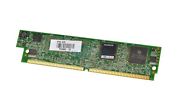
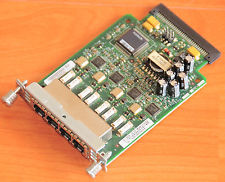
    So I’ve configured voice service a number of times, but never using Cisco equipment. There’s a business starting up here on Orcas Island and they need a number of lines voice and fax service. I had a spare 2801 router laying around and heard that it’s possible to provision voice service using these machines. So I looked on eBay for a module that will provide more than two FXS ports and decided on the VIC-4FXS. When it was delivered, I installed it and booted the router. It told me that it needed a PVDM DSP Module, so I got one of those as well. It has arrived. I have installed it. Now when I boot the router, I don’t get a warning or an error.

    configure the router to send outbound calls to the SIP server

    configure the router to send inbound calls to FXS ports 2,3,4 in round robin

    
    trunk group FXSlines
    !
    voice-port 0/2/1
     trunk-group FXSlines
    !
    voice-port 0/2/2
     trunk-group FXSlines
    !
    voice-port 0/2/3
     trunk-group FXSlines


    configure the router to send inbound calls to the correct ports on the VIC-4FXS

    dial-peer voice 1 pots
     preference 7
     destination-pattern 3602987792
     translate-outgoing called 10
     port 0/2/0
     forward-digits all
    !
    dial-peer voice 2 pots
     preference 2
     destination-pattern 3602987793
     translate-outgoing called 10
     port 0/2/1
     forward-digits all
    !
    dial-peer voice 3 pots
     preference 3
     destination-pattern 3602987794
     translate-outgoing called 10
     port 0/2/2
     forward-digits all
    !
    dial-peer voice 4 pots
     preference 4
     destination-pattern 3602987795
     translate-outgoing called 10
     port 0/2/3
     forward-digits all
    

    configure the router to accept inbound calls from the asterisk call server

    voice service voip
     allow-connections sip to sip
     no supplementary-service sip moved-temporarily
     no supplementary-service sip refer
     fax protocol t38 ls-redundancy 0 hs-redundancy 0 fallback cisco
     sip
      registrar server expires max 3600 min 3600
      localhost dns:8.8.8.8
    

    configure the asterisk call server to send inbound calls to the router

    On asterisk call server, edit sip.conf to register with SIP server on cisco router at 172.16.78.209:

    [fhvoice]
    type=peer
    insecure=port,invite
    context=fhvoice
    disallow=all
    allow=ulaw
    language=en
    canreinvite=no
    host=172.16.78.209
    qualify=20000
    dtmfmode=rfc2833
    

    On asterisk call server, edit extensions.conf and add extensions to the incoming context:

    exten => 3602987792,1,Dial(SIP/fhvoice/${EXTEN},30)
       same => n,Hangup()
    
    exten => 3602987793,1,Dial(SIP/fhvoice/${EXTEN},30)
       same => n,Hangup()
    
    exten => 3602987794,1,Dial(SIP/fhvoice/${EXTEN},30)
       same => n,Hangup()
    
    exten => 3602987795,1,Dial(SIP/fhvoice/${EXTEN},30)
       same => n,Hangup()
    

    configure the asterisk call server to accept outbound calls from the router

  • I just realized how old these name servers are

    I guess I’ve had them around for a while… Maybe I should clean these up…

    cjac@ns1:~$ ls /lib/modules/
    2.6.18-4-xen-amd64colliertech.fw+0  2.6.32-5-amd64
    2.6.24-19-xen                       3.2.0-4-amd64
    
    cjac@ns2:~$ ls /lib/modules/
    2.6.18-4-xen-amd64colliertech.fw+0  2.6.24-19-xen  2.6.32-5-amd64
    cjac@ns2:~$ sudo rsync -aue ssh ns1:/lib/modules/`uname -r` /lib/modules
    

    I remember editing the .config file for that kernel and building it on my first ever 64-bit system back in 2004 or so.

  • Debian on PowerPC successful

    The NVidia card being unable to drive two monitors is a little annoying, and the lack of support for skype and chrome is a bother, but I think I can build chrome… There’ll probably be no flash, I imagine.