Author: C.J. Collier

  • Long Term Stable – 2014.04 @ 20141204T080801

    It’s been one of those nights:

    cjac@ubuntu0:/data/apps/prod$ sudo apt-get upgrade
    Reading package lists... Done
    Building dependency tree       
    Reading state information... Done
    Calculating upgrade... Done
    0 upgraded, 0 newly installed, 0 to remove and 0 not upgraded.
    cjac@ubuntu0:/data/apps/prod$ sudo apt-get dist-upgrade
    Reading package lists... Done
    Building dependency tree       
    Reading state information... Done
    Calculating upgrade... Done
    0 upgraded, 0 newly installed, 0 to remove and 0 not upgraded.
    

    All quiet on the Western Front, it seems.

  • Hello World

    It was a good summer.  I took some time off work and spent a lot of time at the lake with the girls.  Scarlet swam out to the buoy with me at least once.

    I am working on improving the network service out here on Orcas and think we may be able to secure a /20 of public v4 space as well as increase the throughput of the pipe.  We should know more in the next month or so.

  • multipath over disparate media

    default route is now over a set of 3 ipsec tunnels with the voice server at the SIX. Let’s see if this proliant can reliably transport 12Mbit of crypto traffic…

    Screenshot from 2014-06-18 14:52:09

  • Repeater frequencies

    Looks like I’ll be testing the 440.775 and 445.775 frequencies.

    Nothing in the global frequency database:

    http://qrg.globaltuners.com/?q=440.775

    image

  • Juniper Olive VM XML

    For use with

    http://web.dit.upm.es/vnxwiki/index.php/Vnx-rootfsolive

    and

    http://blog.gns3.net/2009/10/olive-juniper/2/

    $ cd /var/lib/libvirt/images
    $ sudo qemu-img create -f qcow2 vnx_rootfs_olive.qcow2 7G
    $ sudo wget ftp://ftp-archive.freebsd.org/pub/FreeBSD-Archive/old-releases/i386/ISO-IMAGES/4.11/4.11-RELEASE-i386-miniinst.iso
    $ sudo brctl addbr testnet
    $ sudo ip addr add 172.18.36.2/24 dev testnet
    $ sudo ip link set up dev testnet
    $ wget -O /tmp/olive.xml https://wp.colliertech.org/cj/wp-content/uploads/2014/05/olive.xml
    $ sudo virsh define /tmp/olive.xml
    $ sudo virsh start olive
    

    /tmp/olive.xml follows:

    
    <domain type='kvm'>
      <name>olive</name>
      <memory unit='KiB'>1048576</memory>
      <currentMemory unit='KiB'>1048576</currentMemory>
      <vcpu placement='static'>2</vcpu>
      <os>
        <type arch='x86_64' machine='pc-1.1'>hvm</type>
        <boot dev='cdrom'/>
      </os>
      <features>
        <acpi/>
        <apic/>
        <pae/>
      </features>
      <clock offset='utc'/>
      <on_poweroff>destroy</on_poweroff>
      <on_reboot>restart</on_reboot>
      <on_crash>restart</on_crash>
      <devices>
        <emulator>/usr/bin/kvm</emulator>
        <disk type='file' device='disk'>
          <driver name='qemu' type='qcow2'/>
          <source file='/var/lib/libvirt/images/vnx_rootfs_olive.qcow2'/>
          <target dev='hda' bus='ide'/>
          <address type='drive' controller='0' bus='0' target='0' unit='0'/>
        </disk>
        <disk type='file' device='cdrom'>
          <driver name='qemu' type='raw'/>
          <source file='/var/lib/libvirt/images/4.11-RELEASE-i386-miniinst.iso'/>
          <target dev='hdc' bus='ide'/>
          <readonly/>
          <address type='drive' controller='0' bus='1' target='0' unit='0'/>
        </disk>
        <controller type='usb' index='0'>
          <address type='pci' domain='0x0000' bus='0x00' slot='0x01' function='0x2'/>
        </controller>
        <controller type='ide' index='0'>
          <address type='pci' domain='0x0000' bus='0x00' slot='0x01' function='0x1'/>
        </controller>
        <controller type='sata' index='0'>
          <address type='pci' domain='0x0000' bus='0x00' slot='0x03' function='0x0'/>
        </controller>
        <interface type='bridge'>
          <mac address='52:54:00:4d:b2:c8'/>
          <source bridge='testnet'/>
          <model type='e1000'/>
          <address type='pci' domain='0x0000' bus='0x00' slot='0x06' function='0x0'/>
        </interface>
        <serial type='pty'>
          <target port='0'/>
        </serial>
        <console type='pty'>
          <target type='serial' port='0'/>
        </console>
        <input type='mouse' bus='ps2'/>
        <graphics type='vnc' port='-1' autoport='yes'/>
        <video>
          <model type='cirrus' vram='9216' heads='1'/>
          <address type='pci' domain='0x0000' bus='0x00' slot='0x02' function='0x0'/>
        </video>
        <memballoon model='virtio'>
          <address type='pci' domain='0x0000' bus='0x00' slot='0x05' function='0x0'/>
        </memballoon>
      </devices>
    </domain>
    
    
  • Configuring voice service on a Cisco 2801 Integrated Services Router via Asterisk

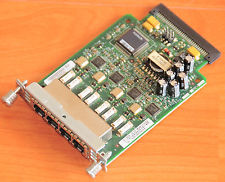
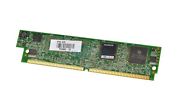
    So I’ve configured voice service a number of times, but never using Cisco equipment. There’s a business starting up here on Orcas Island and they need a number of lines voice and fax service. I had a spare 2801 router laying around and heard that it’s possible to provision voice service using these machines. So I looked on eBay for a module that will provide more than two FXS ports and decided on the VIC-4FXS. When it was delivered, I installed it and booted the router. It told me that it needed a PVDM DSP Module, so I got one of those as well. It has arrived. I have installed it. Now when I boot the router, I don’t get a warning or an error.

    configure the router to send outbound calls to the SIP server

    configure the router to send inbound calls to FXS ports 2,3,4 in round robin

    
    trunk group FXSlines
    !
    voice-port 0/2/1
     trunk-group FXSlines
    !
    voice-port 0/2/2
     trunk-group FXSlines
    !
    voice-port 0/2/3
     trunk-group FXSlines


    configure the router to send inbound calls to the correct ports on the VIC-4FXS

    dial-peer voice 1 pots
     preference 7
     destination-pattern 3602987792
     translate-outgoing called 10
     port 0/2/0
     forward-digits all
    !
    dial-peer voice 2 pots
     preference 2
     destination-pattern 3602987793
     translate-outgoing called 10
     port 0/2/1
     forward-digits all
    !
    dial-peer voice 3 pots
     preference 3
     destination-pattern 3602987794
     translate-outgoing called 10
     port 0/2/2
     forward-digits all
    !
    dial-peer voice 4 pots
     preference 4
     destination-pattern 3602987795
     translate-outgoing called 10
     port 0/2/3
     forward-digits all
    

    configure the router to accept inbound calls from the asterisk call server

    voice service voip
     allow-connections sip to sip
     no supplementary-service sip moved-temporarily
     no supplementary-service sip refer
     fax protocol t38 ls-redundancy 0 hs-redundancy 0 fallback cisco
     sip
      registrar server expires max 3600 min 3600
      localhost dns:8.8.8.8
    

    configure the asterisk call server to send inbound calls to the router

    On asterisk call server, edit sip.conf to register with SIP server on cisco router at 172.16.78.209:

    [fhvoice]
    type=peer
    insecure=port,invite
    context=fhvoice
    disallow=all
    allow=ulaw
    language=en
    canreinvite=no
    host=172.16.78.209
    qualify=20000
    dtmfmode=rfc2833
    

    On asterisk call server, edit extensions.conf and add extensions to the incoming context:

    exten => 3602987792,1,Dial(SIP/fhvoice/${EXTEN},30)
       same => n,Hangup()
    
    exten => 3602987793,1,Dial(SIP/fhvoice/${EXTEN},30)
       same => n,Hangup()
    
    exten => 3602987794,1,Dial(SIP/fhvoice/${EXTEN},30)
       same => n,Hangup()
    
    exten => 3602987795,1,Dial(SIP/fhvoice/${EXTEN},30)
       same => n,Hangup()
    

    configure the asterisk call server to accept outbound calls from the router

  • I should be able to do voice with this hardware now, right?

    wpid-img_20140506_213735.jpg

    wpid-img_20140512_152937.jpg

    wpid-img_20140506_215451.jpg

    wpid-img_20140512_153150.jpg

    System Bootstrap, Version 12.4(13r)T, RELEASE SOFTWARE (fc1)
    Technical Support: http://www.cisco.com/techsupport
    Copyright (c) 2006 by cisco Systems, Inc.
    PLD version 0x10
    GIO ASIC version 0x127
    c2801 platform with 393216 Kbytes of main memory
    Main memory is configured to 64 bit mode with parity disabled
    
    
    Readonly ROMMON initialized
    
    program load complete, entry point: 0x8000f000, size: 0xcb80
    program load complete, entry point: 0x8000f000, size: 0xcb80
    
    program load complete, entry point: 0x8000f000, size: 0x202624c
    Self decompressing the image : ################################################################################################################################################################################################################################################################################################################################################################################################ [OK]
    
    Smart Init is enabled
    smart init is sizing iomem
      ID            MEMORY_REQ         TYPE
                    0X003AA110 public buffer pools
                    0X00211000 public particle pools
                    0X00020000 Crypto module pools
                    0X00120000 VPM buffer pools
    0X058A          0X00000000 UNKNOWN Card in slot 1
    0X003A          0X00000000 Card in slot 2
                    0X000021B8 Onboard USB
    
    If any of the above Memory Requirements are 
    "UNKNOWN", you may be using an unsupported
    configuration or there is a software problem and
    system operation may be compromised.
    
    Allocating additional 27896858 bytes to IO Memory.
    PMem allocated: 364904448 bytes; IOMem allocated: 37748736 bytes
    
                  Restricted Rights Legend
    
    Use, duplication, or disclosure by the Government is
    subject to restrictions as set forth in subparagraph
    (c) of the Commercial Computer Software - Restricted
    Rights clause at FAR sec. 52.227-19 and subparagraph
    (c) (1) (ii) of the Rights in Technical Data and Computer
    Software clause at DFARS sec. 252.227-7013.
    
               cisco Systems, Inc.
               170 West Tasman Drive
               San Jose, California 95134-1706


    Cisco IOS Software, 2801 Software (C2801-ADVENTERPRISEK9-M), Version 12.4(11)T, RELEASE SOFTWARE (fc2)
    Technical Support: http://www.cisco.com/techsupport
    Copyright (c) 1986-2006 by Cisco Systems, Inc.
    Compiled Sat 18-Nov-06 17:56 by prod_rel_team
    Image text-base: 0x6008FA68, data-base: 0x63600000
    
    
    This product contains cryptographic features and is subject to United
    States and local country laws governing import, export, transfer and
    use. Delivery of Cisco cryptographic products does not imply
    third-party authority to import, export, distribute or use encryption.
    Importers, exporters, distributors and users are responsible for
    compliance with U.S. and local country laws. By using this product you
    agree to comply with applicable laws and regulations. If you are unable
    to comply with U.S. and local laws, return this product immediately.
    
    A summary of U.S. laws governing Cisco cryptographic products may be found at:
    http://www.cisco.com/wwl/export/crypto/tool/stqrg.html
    
    If you require further assistance please contact us by sending email to
    export@cisco.com.
    
    Installed image archive
    Cisco 2801 (revision 7.0) with 356352K/36864K bytes of memory.
    Processor board ID FTX150804QM
    2 FastEthernet interfaces
    1 Virtual Private Network (VPN) Module
    4 Voice FXS interfaces
    2 DSPs, 32 Voice resources
    DRAM configuration is 64 bits wide with parity disabled.
    191K bytes of NVRAM.
    509544K bytes of ATA CompactFlash (Read/Write)
    
  • I just realized how old these name servers are

    I guess I’ve had them around for a while… Maybe I should clean these up…

    cjac@ns1:~$ ls /lib/modules/
    2.6.18-4-xen-amd64colliertech.fw+0  2.6.32-5-amd64
    2.6.24-19-xen                       3.2.0-4-amd64
    
    cjac@ns2:~$ ls /lib/modules/
    2.6.18-4-xen-amd64colliertech.fw+0  2.6.24-19-xen  2.6.32-5-amd64
    cjac@ns2:~$ sudo rsync -aue ssh ns1:/lib/modules/`uname -r` /lib/modules
    

    I remember editing the .config file for that kernel and building it on my first ever 64-bit system back in 2004 or so.

  • Debian on PowerPC successful

    The NVidia card being unable to drive two monitors is a little annoying, and the lack of support for skype and chrome is a bother, but I think I can build chrome… There’ll probably be no flash, I imagine.